Testing-Release-Notes 26091303bro
Neanderfunk-Testfirmware (broken) auf Basis von Gluon v2023.2.6
Firmware-Stand: 26091303bro, gebaut am 13.09.2026. Die Images liegen
auf Freifunk Neanderfunk Firmware Seite
Gegenüber der Testversion vom Vortag (26091213bro) neu: mehr Stabilität für Dualband-Router mit wenig Arbeitsspeicher, keine Dauerlast mehr bei Mesh-VPN ohne Internet, eine realistische Kanalauslastung auf der Karte sowie die SSH-Befehle vpn und flash (Einzelheiten unten).
Das ist eine Testversion. Sie steckt voller Neuerungen aus den letzten zwei Wochen, ist aber noch nicht final. Wer mag, spielt sie auf einen Router, schaut sich um und meldet, was auffällt: was gut ist und was nicht.
Rückmeldungen bitte an:
- E-Mail: projekt@neanderfunk.de
- Mastodon: @neanderfunk@nrw.social
- Telegram: Neanderfunk-Gruppe
So kommt die Testfirmware auf den Router
Per SSH auf dem Router anmelden und diese eine Zeile einfügen:
U=http://imageslive.ffdus.de/images2023.2ad;C=$(uci get autoupdater.broken.mirror|cut -d/ -f6);T=$C;grep -q '"ssh-' /lib/gluon/site.json&&T=$C-key;for D in $(wget -qO- $U/|grep -o 'images-[0-9]*'|sort -ru);do M=$U/$D/$T/$C/sysupgrade;wget -qO- $M/broken.manifest|grep ^BRANCH>/dev/null&&break;M=;done;echo ${M:-kein Image fuer $T};[ "$M" ]&&{ :>/tmp/au;(trap '' HUP;exec autoupdater -f -b broken $M)>>/tmp/au 2>&1 </dev/null& tail -f /tmp/au& sleep 60;kill $!;exit;}
- Die Zeile sucht die neueste fertige Testfirmware für die Domain des Routers, mit oder ohne SSH-Keys, genau wie bisher.
- Das Update läuft im Hintergrund. Die Ausgabe ist eine Minute lang zu sehen, dann meldet sich die Sitzung von selbst ab. Danach flasht der Router und startet neu, das dauert ein paar Minuten.
- An der Konfiguration ändert die Zeile nichts. Mit dem nächsten Stable-Release kommt der Router von selbst wieder auf stable.
- Steht dort „No new firmware available“, ist der Router schon auf diesem Stand oder neuer.
Einrichtung (Setup-Mode)
-
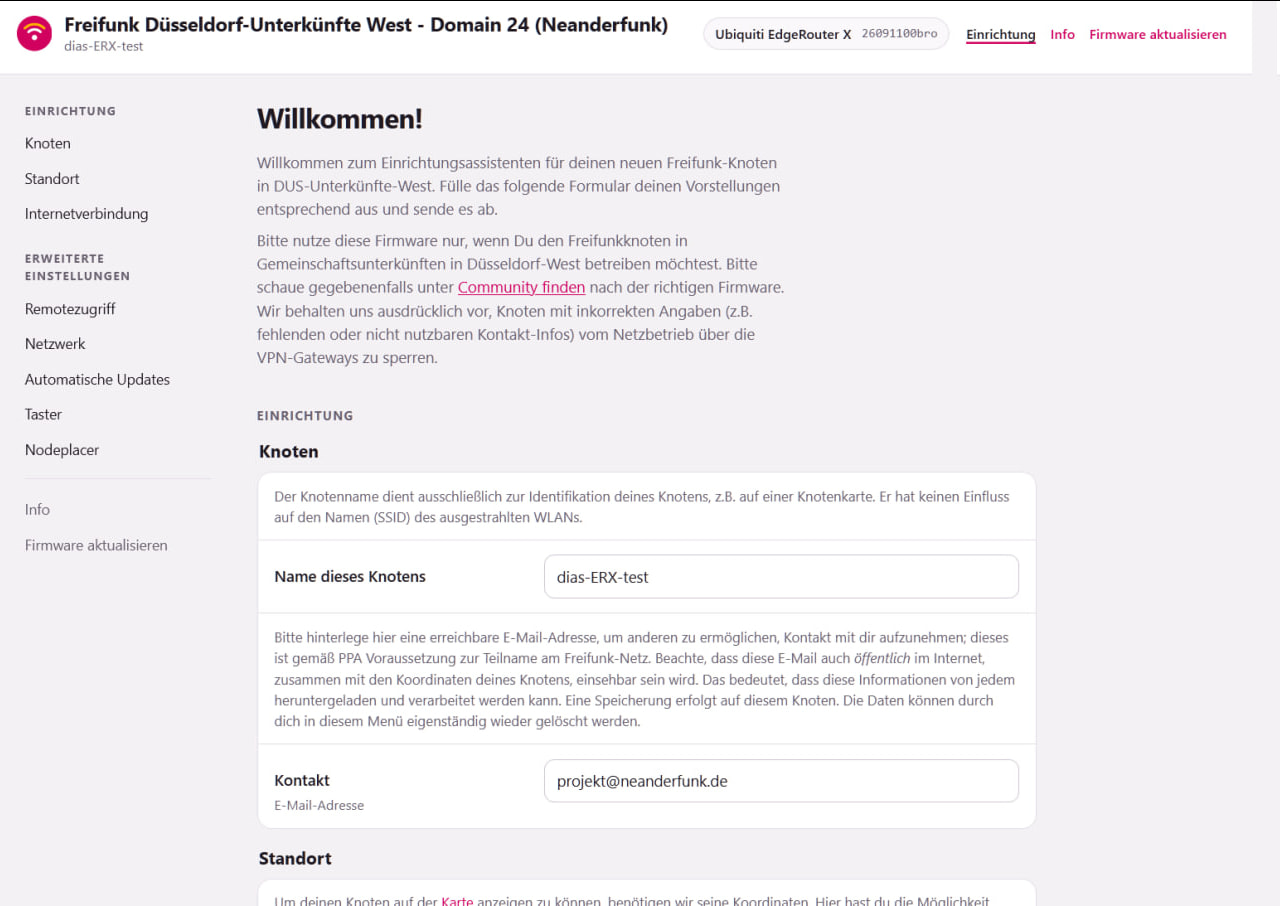
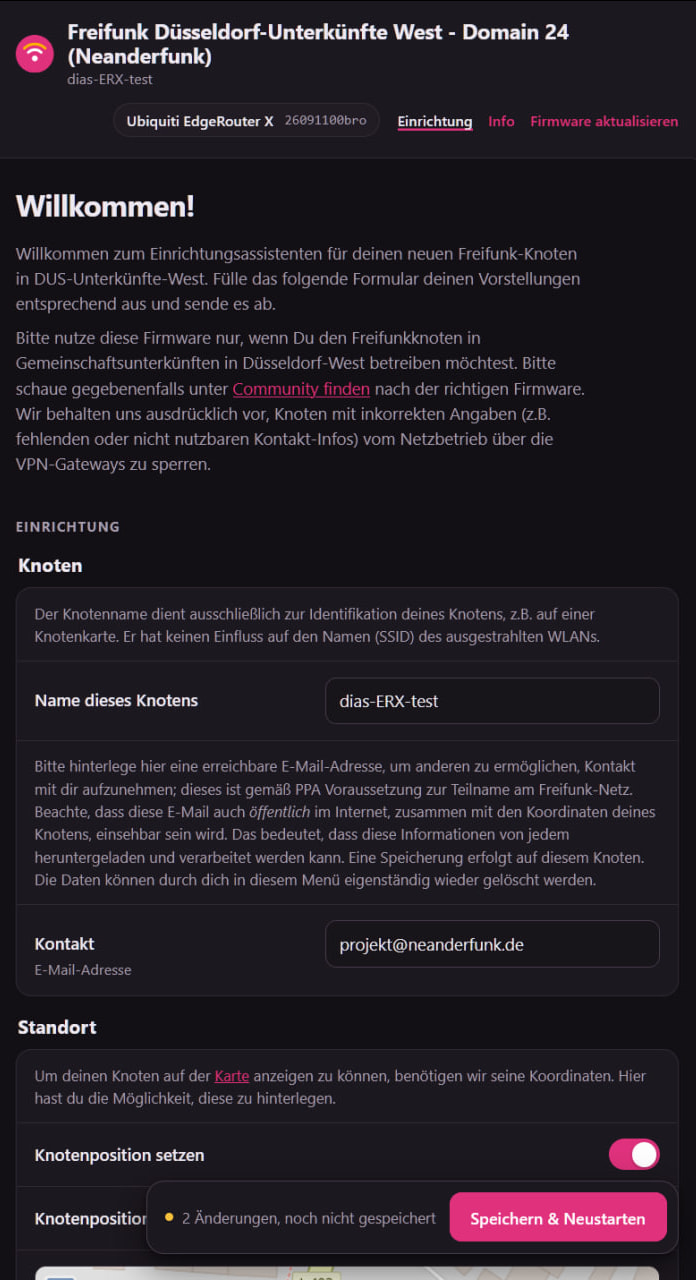
Neues Design: Alles auf einer Seite, und beim Wechseln geht keine Eingabe mehr verloren. Auch auf dem Handy im Hochformat bedienbar, mit Dark Mode. Fehler werden direkt am Feld erklärt. Und das Setup trägt jetzt das Neanderfunk-Logo

-
Leichter erreichbar: Neben http://192.168.1.1 geht jetzt auch http://setup.gluon oder http://gluon.setup.
-
Einrichten per WLAN, ohne Kabel: Im Setup-Mode spannt der Router ein eigenes WLAN auf.
- Name:
setup.gluon_plus die letzten 4 Stellen der MAC-Adresse - Passwort:
freifunk_plus die ersten 2 Stellen, alles klein - Beispiel: Aus der MAC
28:d1:27:db:33:f1werden das WLANsetup.gluon_33f1und das Passwortfreifunk_28.
Nach dem Verbinden öffnet sich die Setup-Seite von allein. Nach 20 Minuten schaltet sich das Setup-WLAN ab, per Kabel geht es weiter.
- Name:
-
Neue Einstellungen:
- Nodeplacer erlauben oder verbieten: Die Community kann den Router dann ohne Besuch vor Ort in eine andere Domäne umziehen.
- WLAN-Taste belegen, z. B. als Nachtmodus mit LEDs aus.
- Client-WLAN nach Zeitplan (AP-Timer).
-
Ungeduld wird nicht mehr bestraft: Wer zweimal auf „Speichern & Neustarten“ tippt, bekommt keinen Router mehr, der plötzlich „OpenWrt“ heißt und auf UTC-Zeit steht.
WLAN
- Kanäle und Sendeleistung bleiben so, wie eingestellt, auch nach Updates.
- Router bleiben nicht mehr auf der Offline-SSID hängen.
Stabilität
- Dualband-Router mit wenig Arbeitsspeicher laufen stabil: Auf Routern mit 64 MB RAM und zwei Funkmodulen (z. B. TP-Link Archer C2 v3, C25, C58, C60, D50, TL-WR902AC, FRITZ!WLAN Repeater 1750E) wurde es mit eingeschaltetem 5 GHz eng bis zum Absturz. Diese Router bekommen jetzt komprimierten Arbeitsspeicher (zram) und verzichten auf ein paar Extras.
- Etwas mehr freier Arbeitsspeicher auf allen Routern: Hintergrunddienste laufen sparsamer.
- Mesh-VPN an, aber kein Internet am WAN-Port: Die vergeblichen VPN-Verbindungsversuche bremsen den Router nicht mehr aus. Bisher lief die Last dabei über die Zahl der CPU-Kerne.
- Weniger unnötige automatische Neustarts.
- Die NodeMonitor-App zeigt den Gateway-Status richtig an.
Karte
- Keine unmögliche Kanalauslastung mehr (über 100 % oder unter 0), wie sie einige Router mit MediaTek-WLAN (MT7915/MT7981) gemeldet haben.
Statusseite des Routers
- Die aktiven SSIDs
- Offline-SSID-Zähler: gerade offline, Offline-SSID seit dem Start, Gateway-Verluste
- Link-Geschwindigkeit je LAN-Port
- Flash- und RAM-Größe, Boardname und CPU
SSH-Login
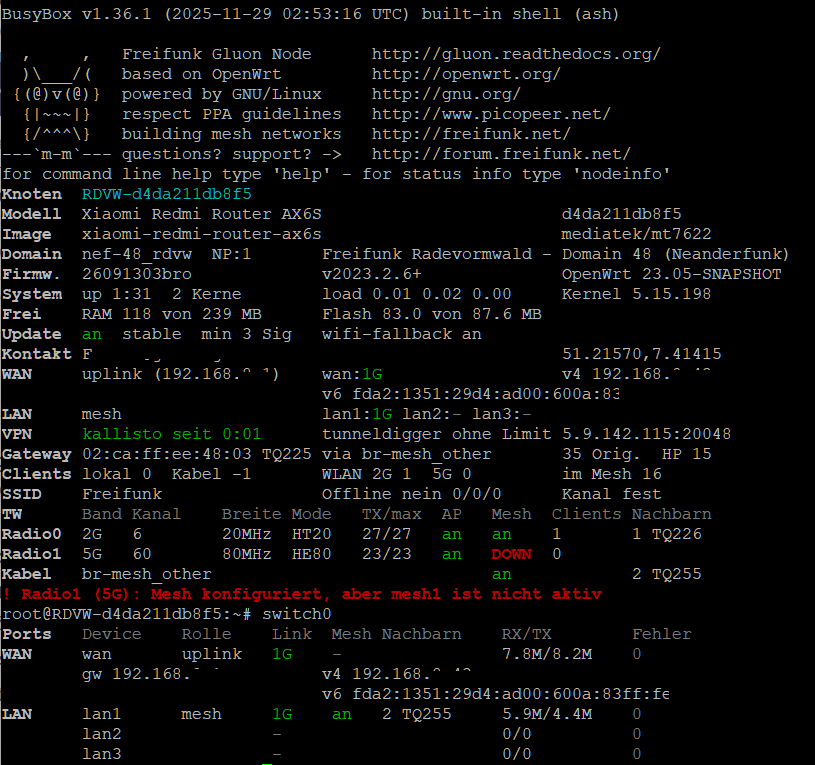
- Neu gestaltet und farbig, mit mehr Infos und Warnungen.
nodeinfozeigt Nachbarn und LAN-Ports.- LAN-Ports lassen sich per Befehl zwischen Mesh und Client umschalten.
helpist vollständig.vpnzeigt, ob das Mesh-VPN an ist, und schaltet es dauerhaft an oder aus.flash <URL>bzw.sysupgradeklappen jetzt auch auf Routern mit wenig Arbeitsspeicher zuverlässig: Vor dem Flashen werden WLAN und Netz so angehalten, wie es der Autoupdater tut.
Beim Testen besonders interessant
Vor allem: der neue Setup-Mode, eingerichtet per WLAN vom Smartphone aus. Den Router in den Setup-Mode bringen (Reset-Taste mindestens 3 Sekunden halten), dann mit dem Handy ins WLAN setup.gluon_… gehen (siehe oben) und den Router komplett einrichten. Uns interessiert:
- Taucht das Setup-WLAN auf, klappt das Verbinden mit dem Passwort?
- Öffnet sich die Setup-Seite von allein? Wenn nicht: Geht es über http://setup.gluon?
- Lässt sich alles gut bedienen, auch im Hochformat und im Dark Mode?
- Kommt der Router nach „Speichern & Neustarten“ richtig eingerichtet ins Netz?
Bitte dazu schreiben, welches Handy und welches System (iPhone/iOS-Version, Android-Version und Hersteller). Gerade ältere Android-Geräte und iPhones verhalten sich bei WLANs ohne Internet unterschiedlich.
Außerdem:
- Bleiben Kanäle und Sendeleistung nach dem Update erhalten?
- Dualband-Router mit 64 MB (Archer C2 v3, C25, C58, C60, D50 …): Läuft er über Tage stabil, auch mit vielen WLAN-Clients?
P.S. In der Finale Release wird der Wifi-Setupmode über einen (kurzen) Tastendruck zu starten sein, LED blinkt dann schneller statt nur langsam.